 Visualization
Ornamental Door Panel DXF, Fleur de Lis Oval Medallion Gate Insert CNC File, Plasma Cut Entry Door SVG, Arabesque Screen
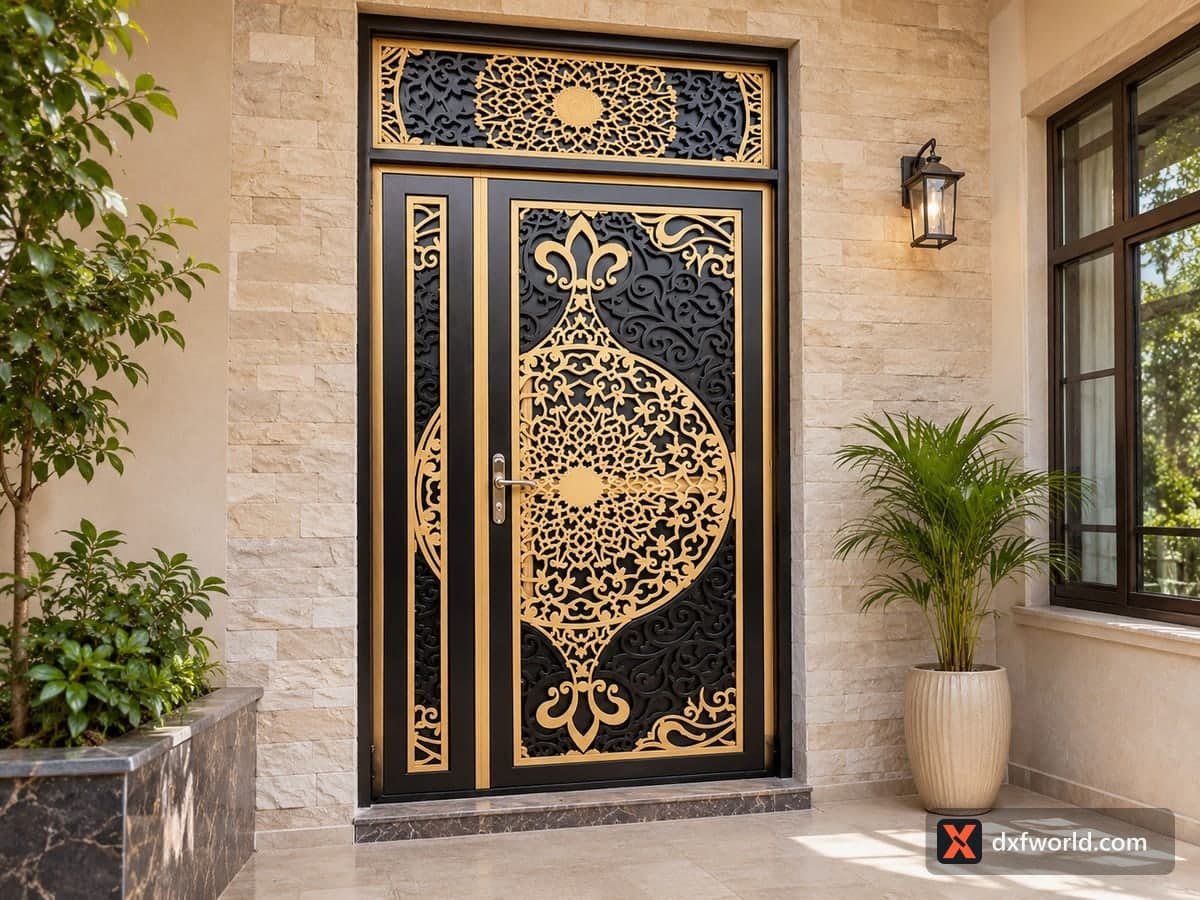
A full-size decorative door or gate insert, 1000 × 2000 mm (39.4 × 78.7 in), with a narrow solid border around dense pierced ornament: a large central oval built from rings of lace-like arabesques, a fleur-de-lis crest at the top and bottom, and leafy scrolls filling the corners. The free DXF and SVG hold cut lines only and suit a CNC router, plasma table or large-format laser.
- Formats
- SVG, DXF
- Size
- 1,000 × 2,000 mm (39.37 × 78.74 in)
- Material
- Plywood, MDF, acrylic or metal (scale to your piece)
- Cut length
- 130.20 m
- Est. time, 10 W diode (3 mm)
- 434 min 00 s
- Est. time, 40 W CO2 (3 mm)
- 180 min 50 s
- Layers
- CUT only, no engraving
Free account required to download
How to make it
- 01Check the door or frame opening and scale the 1000 × 2000 mm file proportionally if needed.
- 02Do a short test on the central oval area to set speed and kerf for the thinnest bridges.
- 03Cut the inner tracery from the centre outward, then the scrolls, and finish with the outer rim.
- 04Clean the edges, prime, paint or powder coat, and fix the panel into the frame or onto its backing.
The design
The panel is symmetrical on both axes. A tall oval fills the middle, drawn as several rings of tightly knit tracery around a small lens-shaped opening at the centre. Above and below the oval sit two big fleur-de-lis crests flanked by curling acanthus scrolls, and leaves and C-scrolls fill the four corners. A thin solid rim runs around the edge, so the insert can be welded or screwed into a door frame.
Cutting a full-size door panel
At 1000 × 2000 mm the panel matches a standard sheet of steel or MDF, so it is meant for a plasma or fibre laser table or a CNC router rather than a hobby laser. The centre of the oval has the thinnest bridges; in steel use at least 2 mm sheet and in MDF at least 12 mm, and with a router pick a 3 mm bit or smaller. If you need a narrower door, scale the file proportionally and check the centre again, or crop the oval and use it on its own as a wall medallion.
Finishing ideas
The photo shows it in gold over a black backing in a front door with a matching transom, a look you can copy by painting the cut panel gold and mounting it on black-painted glass or sheet metal. Black powder coat on steel is the classic gate finish. In MDF, paint it white and back it with mirror or fabric for a headboard, a closet door, or a tall room divider panel.
Questions about this file
Is this a full door size?
Yes, it is drawn at 1000 × 2000 mm (39.4 × 78.7 in), close to a standard single door leaf or a gate panel.
Will a hobby laser handle the full panel?
Not at full size. Scale it down for a small wall panel, but the central tracery gets very fine, so keep it above roughly 400 mm wide.
What steel thickness is best?
2 to 3 mm mild steel on a plasma or fibre table holds the thin centre bridges and keeps the panel flat.
How do I get the gold and black look?
Paint the cut panel gold and mount it over a sheet painted black, or set it in front of dark glass.
Can I use only the oval medallion?
Yes, delete the corners and crests in your software and cut the oval as a separate wall medallion.
Similar files