 Visualization
Christmas Shapes SVG Bundle, Wooden Christmas Cutouts Laser Cut File, Reindeer and Ice Skate Shapes DXF
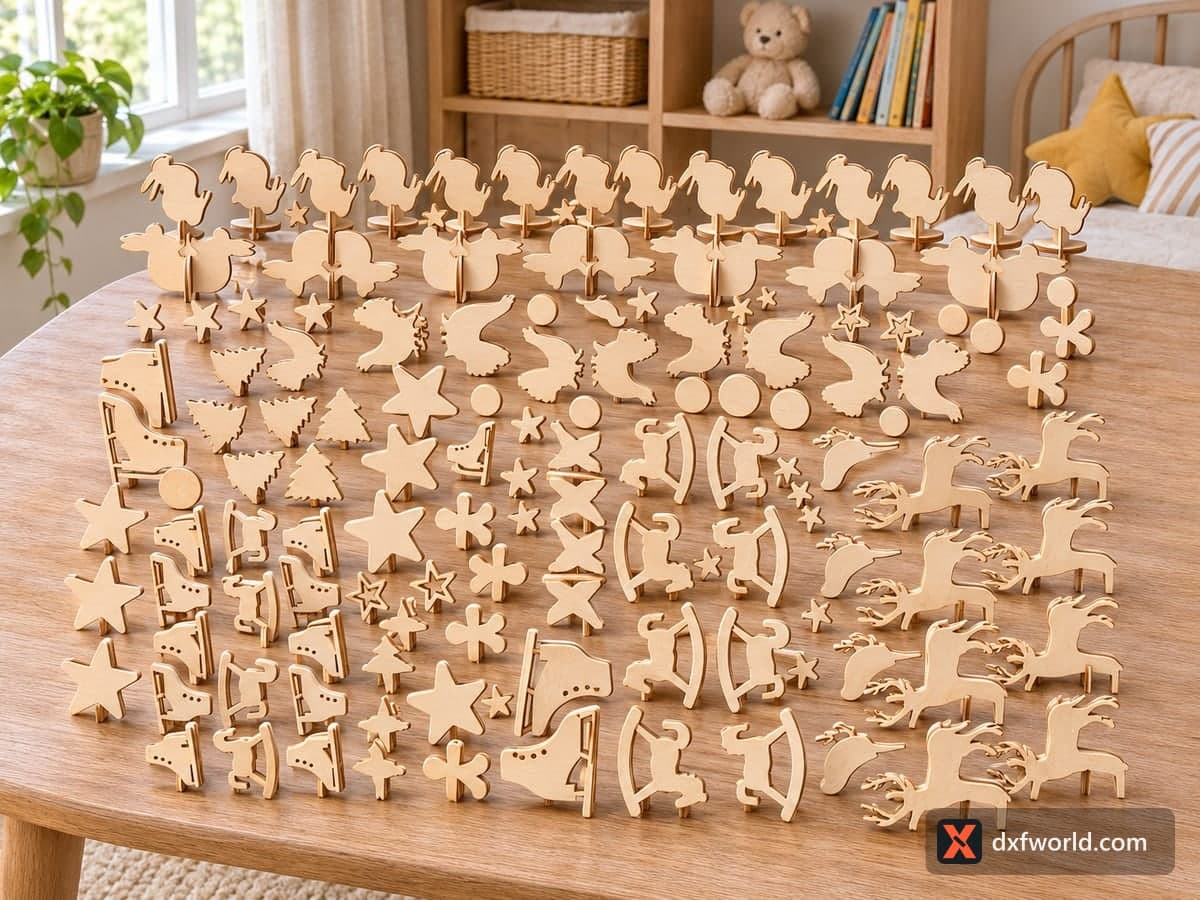
A full sheet of small Christmas cut-outs nested on one 1000 × 700 mm (39.37 × 27.56 in) layout: ice skates, leaping reindeer, rocking horses, little fir trees, stars in several sizes, gingerbread men, round discs, fluffy Santa hats and a row of small standing animals with slot-in stands. The free SVG and DXF hold cut lines only and give well over a hundred blank shapes for painting, crafts and tree trimming.
- Formats
- SVG, DXF
- Size
- 1,000 × 700 mm (39.37 × 27.56 in)
- Material
- Plywood, MDF, acrylic or metal (scale to your piece)
- Cut length
- 49.39 m
- Est. time, 10 W diode (3 mm)
- 164 min 39 s
- Est. time, 40 W CO2 (3 mm)
- 68 min 36 s
- Layers
- CUT only, no engraving
Free account required to download
How to make it
- 01Pick the blocks of shapes you need and arrange them to fit your laser bed.
- 02Cut one stand and one animal as a test and adjust the stand slots to your plywood.
- 03Cut the small details such as skate holes and antlers first, then the outlines.
- 04Sand the edges, paint or stain the shapes and add twine loops or stand the animals up.
What is on the sheet
The layout is packed edge to edge. Along the top runs a row of small standing animals, each with a matching cross-shaped stand that slots onto it. Below them come fluffy Santa hats, ice skates with lace holes, fir trees, rocking horses on curved rockers, reindeer with full antlers, gingerbread men, plain discs and stars from tiny to palm-sized. Most shapes repeat four to eight times, so one cut gives enough for a class, a party table or a market stall.
Cutting it on a smaller bed
The sheet is a full metre wide, so on a desktop laser select one block of shapes at a time and move it onto your bed, or copy only the shapes you want into a new file. The stands are slotted for one material thickness: measure the slot width in your software and pick plywood that matches, or scale the stand and animal together until it does, with a test cut first. The antlers and skate blades are the thinnest parts, so do not shrink the sheet much below its drawn size in 3 mm wood.
Ideas for the shapes
Drill or engrave a small hole near the top of the skates, trees and stars and they become tree decorations on red twine. Leave them blank for a kids' paint-your-own table, glue them on gift boxes as toppers, or scatter the stars and trees across a Christmas dinner table. The standing animals make a little parade along a mantel. Sellers can bag mixed sets of ten blanks for craft fairs, and schools buy them by the hundred for December projects.
Questions about this file
How many shapes are there?
Well over a hundred, from tiny stars to reindeer about 120 mm long, all nested on one sheet.
Do the shapes have hanging holes?
No, they are plain blanks. Add a small circle near the top in your software or drill a hole after cutting.
My laser bed is small. What can I do?
Split the sheet into parts: select one area at a time, move it onto your bed and cut it as its own job.
Which material suits a children's craft table?
Light 3 mm birch plywood or MDF takes poster paint and markers well and has no sharp edges after a light sanding.
Can I cut just the reindeer?
Yes, delete the other shapes in your software and duplicate the reindeer as many times as you want.
Similar files