 Visualization
Yantra Frame SVG, Sacred Geometry Laser Cut File DXF, Meditation Altar Decor, Spiritual Ornament Blank
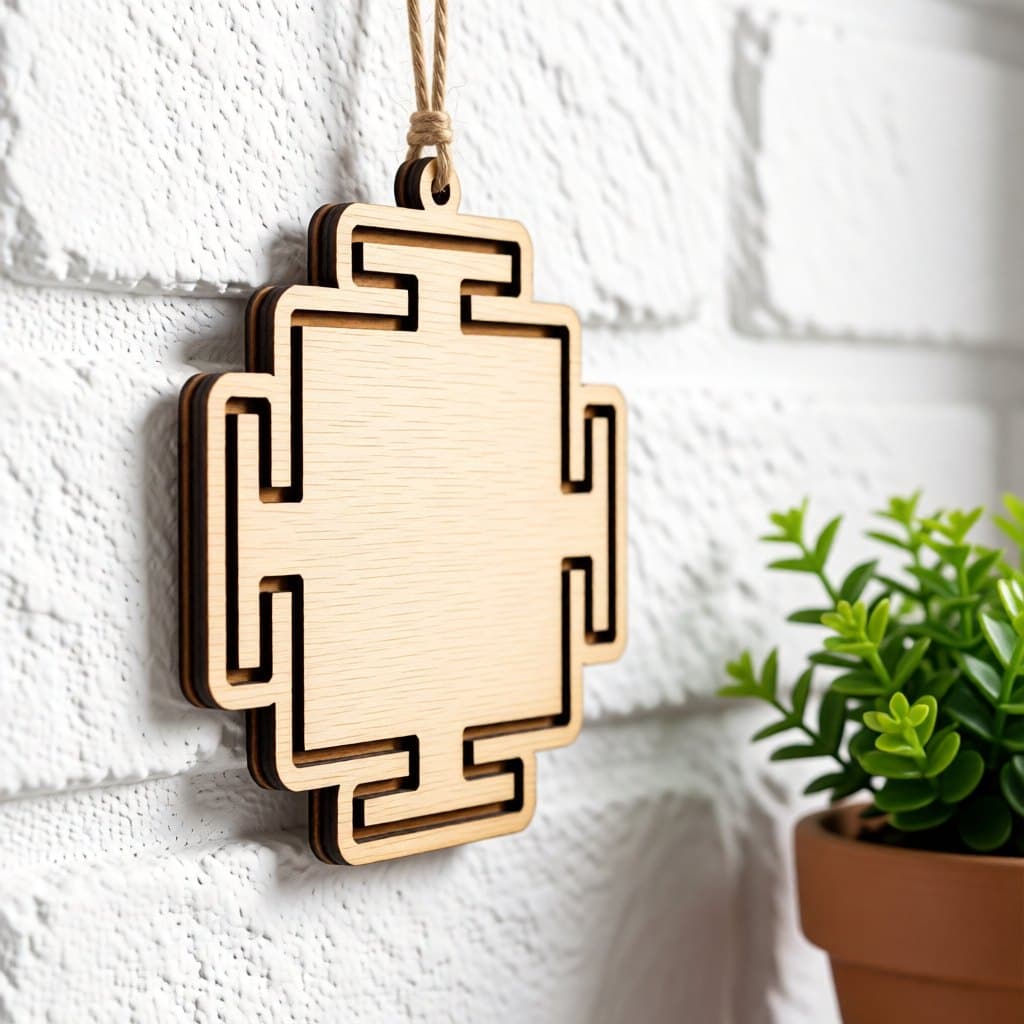
The outer square of a traditional yantra, called the bhupura: a stepped, cross-like frame with a T-shaped gate opening on each of its four sides, traced by one bold engraved line. The centre is empty, so it works as a blank for your own symbol, photo or text. Overall size is 3.54 × 3.84 in (90 × 97.5 mm), with the 4 mm hole above the top gate.
- Formats
- SVG, DXF
- Size
- 90 × 98 mm (3.54 × 3.84 in)
- Parts
- 1
- Hanging hole
- 4 mm
- Cut length
- 0.37 m
- Engraving area
- 11.9 cm²
- Material
- 3 mm plywood, MDF or acrylic
- Est. time, 10 W diode
- 3 min 12 s
- Est. time, 40 W CO2
- 1 min 10 s
- Est. time, 100 W CO2
- 44 s
- Per 300 × 400 mm sheet
- 9 pcs
- Per 600 × 400 mm sheet
- 18 pcs
- Layers
- CUT (red), ENGRAVE (black)
- License
- CC0 1.0: free for personal and commercial use
Free account required to download
How to make it
- 01Import the frame at 90 × 97.5 mm and place any centre design inside the stepped square.
- 02Engrave the border line and your added artwork together in one job.
- 03Cut the stepped outline and check that the inner corners of the T gates come out sharp.
- 04Paint the line gold if you like, and hang the frame from the top gate with red or saffron thread.
The four-gated square
In a yantra, the bhupura is the outer enclosure around the inner circles and triangles, and its four T-shaped gates face the four directions. This file gives you just that frame. The cut follows the stepped outline, and a single bold line is engraved a little inside it, tracing every step and gate. Everything inside is plain wood. The result is calm, symmetrical and very geometric, closer to architecture than to an illustration.
Using the empty centre
The open centre is the point of this design. Layer your own artwork into it: an om symbol, a lotus, a Sri Yantra, a zodiac sign, initials or a small photo. You can add that engraving before cutting, or cut a second piece and glue it on top for a stacked look. The single line takes little time: the estimate is 3 min 12 s for 10 W diodes and 1 min 10 s or 44 s for 40 W or 100 W CO2 lasers, all in 3 mm plywood. The right-angled steps give the cut many corners, and slightly slower corner speed on a diode keeps them square.
Spiritual and decor uses
- Meditation corners and home altars, with a symbol engraved in the centre.
- Yoga studio gifts and class tokens.
- Diwali decor painted gold and red.
- A minimalist geometric ornament for modern trees and shelves.
Questions about this file
What is a bhupura?
It is the square outer boundary of a yantra, with a gate on each side. In traditional diagrams it encloses the inner pattern; here it comes on its own so you can fill it.
What can I put in the middle?
Anything that fits the square: an om, a lotus, a mandala, a zodiac sign, a monogram or a short mantra. Add it as an extra engrave layer before cutting.
Can I stack two layers?
Yes. Cut the frame from one wood or acrylic colour, then cut a smaller centre piece in a contrasting material and glue it into the middle.
Does it work painted gold?
Gold or brass paint along the engraved line looks traditional, especially on dark plywood or on red acrylic for Diwali.
Can I sell yantra pieces made from this file?
Yes, you can sell the frames, with or without your own centre designs, in shops and at markets.
Similar files