 Visualization
Simple Christmas Tree SVG, Three Tier Tree Silhouette Laser Cut DXF, Beginner Kids Craft Kit Ornament Blank
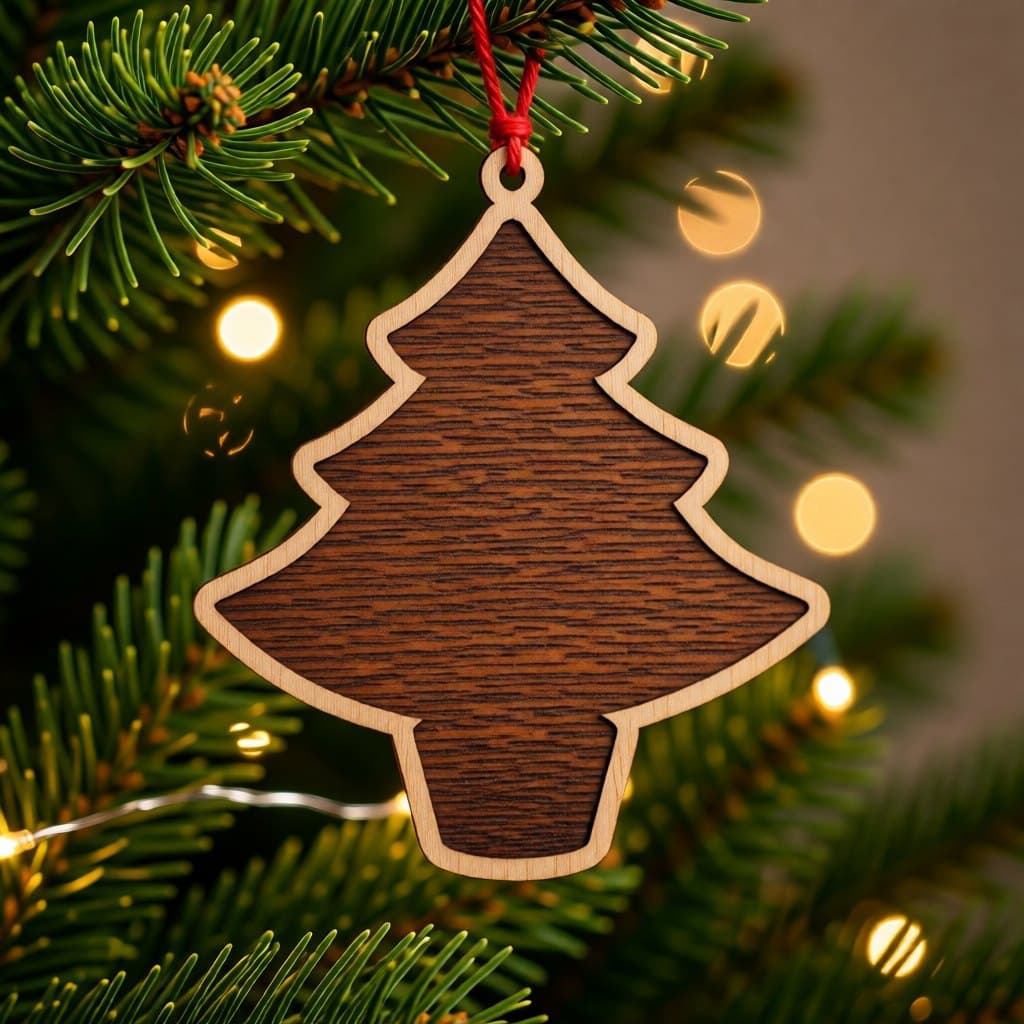
The simplest tree in the collection: three soft, curved tiers that widen toward the base, standing on a short tapered trunk that looks like a little pot. The whole tree is one solid engraved shape inside a light 3 mm border, with no small parts at all. You get a 90 × 104 mm piece (3.54 × 4.09 in) that hangs from a 4 mm hole in its peak.
- Formats
- SVG, DXF
- Size
- 90 × 104 mm (3.54 × 4.09 in)
- Parts
- 1
- Hanging hole
- 4 mm
- Cut length
- 0.34 m
- Engraving area
- 35.3 cm²
- Material
- 3 mm plywood, MDF or acrylic
- Est. time, 10 W diode
- 7 min 00 s
- Est. time, 40 W CO2
- 2 min 26 s
- Est. time, 100 W CO2
- 1 min 42 s
- Per 300 × 400 mm sheet
- 9 pcs
- Per 600 × 400 mm sheet
- 18 pcs
- Layers
- CUT (red), ENGRAVE (black)
- License
- CC0 1.0: free for personal and commercial use
Free account required to download
How to make it
- 01Decide whether you are making engraved trees or blank craft-kit trees, and switch the engrave layer on or off before importing.
- 02Import at full size and nest as many as your sheet allows; a 300 × 400 mm board takes nine.
- 03Run the job and use the solid fill as a check: stripes or pale patches point to focus or bed-level problems.
- 04Sand the edges smooth for small hands, add ribbon through the tip, and pack with paints if you are making kits.
Nothing to go wrong
Three curved tiers, a pot-shaped trunk, and a smooth border. That is all there is, and it is exactly why this file is useful. A beginner with a new laser gets a clean result first time, children can sand and paint it without snapping anything, and a shop can cut dozens without checking each one.
First project on a new laser
If you have just set up a machine, this is a good calibration piece. The outline tells you whether your cut goes all the way through, and the large solid fill shows whether your engraving is even across the bed. Uneven stripes or a lighter patch in the fill mean the focus or the bed level needs attention.
Expect the fill to take most of the time: the estimate is 7 min flat on a 10 W diode, against 1 min 42 s on a 100 W CO2 (3 mm plywood). If you only need blanks for painting, switch the engraving off and each tree takes a fraction of that.
Craft kits and classrooms
Unengraved, the tree becomes a blank that kids decorate with paint, sequins, buttons and glitter glue. Pack a tree, a short ribbon and three paint pots in a bag for a cheap kit. Engraved, the dark tree with its light border looks finished on its own, so it sells as a plain rustic ornament too.
Ideas
- Classroom craft packs for a whole class.
- Scout and youth group Christmas activities.
- Bulk orders for church fairs and charity stalls.
- A "first laser project" in beginner workshops.
Questions about this file
Can I cut it as a plain blank without engraving?
Yes, and many people do for craft kits. Turn off the engrave layer and the tree cuts in a fraction of the time.
Is it safe for children to sand and paint?
There are no thin parts or sharp inner corners. Give the edges a quick sand before handing them out and they are easy for small hands.
Why is my fill engraving striped?
Stripes usually mean the lens is slightly out of focus or the bed is not level. This tree's big fill makes those problems easy to see.
How many trees fit on a large sheet?
Eighteen on a 600 × 400 mm sheet, which helps when you are cutting for a whole class.
Can I add a name?
Engrave it on the back, or cut the tree as a blank and engrave the name across the middle tier instead of the fill.
Similar files